Friday, November 4, 2016
Making Music Beats on Linux Ubuntu with Hydrogen
Making Music Beats on Linux Ubuntu with Hydrogen
I am going to review a couple of Music Making Softwares for Linux and am starting with the simplest and one of the best!HYDROGEN. Hydrogen basically is a pattern based drum programming software which in layman terms means, it allows you to make your own beats.And in case you arent much into music, you might be wondering “what the hell will i do with this piece of software”...well here is a word from my friends whove tried this: “Its pretty fun playing with this software, n even without knowing much, you could actually MAKE SUM MUSIC!!!”
About the software:(technical:from the softwares website itself!)
- General
- Very user-friendly, modular, fast and intuitive graphical interface based on QT 3.
- Sample-based stereo audio engine, with import of sound samples in .wav, .au and .aiff formats.
- Support of samples in compressed FLAC file.
- Sequencer and mixer
- Pattern-based sequencer, with unlimited number of patterns that can be chained into a song!
- Up to 64 ticks per pattern with individual level per event and variable pattern length.
- 32 instrument tracks with volume, mute, solo, pan capabilities.
- Multi layer support for instruments (up to 16 samples for each instrument).
- Ability to import/export song files.
- Unique human velocity, human time, pitch and swing functions.
- Multiple patterns playing at once.
- Other
- JACK, ALSA, PortAudio and OSS audio drivers.
- ALSA MIDI and PortMidi input with assignable midi-in channel (1..16, ALL).
- Import/export of drumkits.
- Export song to wav file.
- Export song to midi file.
Some more nice points about Hydrogen that Ive collected:
- Ardour (another Linux DAW) supports import of Hydrogen files directly...n even some other softwares are implimenting support to its song format...
- There are plenty of drumkits and drumloops available all for FREE in the Hydrogen community.
- Support for LADSPA plugins, that let you add more effects for your beats!
- Its cross platform, so you dont have to bother about losing your audio data when you switch between operating systems(i found this point really useful!)
- Really lightweight, so you can happily work on Hydrogen and other music making software simultaneously!
- Best of all: Its completely FREE!
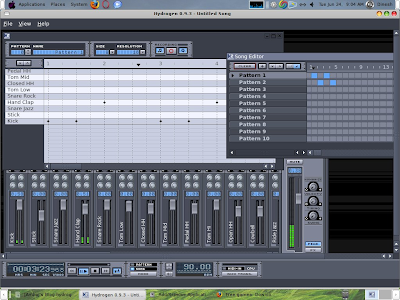 This is how HYDROGEN looks
Installation:
To install Hydrogen issue the following command in the terminal window (Applications -> Accessories -> Terminal)
sudo apt-get install hydrogenthat will install the basic hydrogen with a default drum kit..if you want a few more drum kits(actually a lot more!) issue the following command in the terminal window.
sudo apt-get install hydrogen-drumkitsNow that youve got the software installed, you can find it in the (Applications-> Sound & Video)
Simple Tutorial: (for people with absolutely no knowledge about making music!!!)
Well those people who already know a bit of music making and create electronic music, I m sure you guys will definitely know how to get some help for yourself..for you guys this tutorial is nothing more than a stupid long procedure to introduce the hydrogens interface...this tutorial is intended for all those, who want to make music, but know nothing about its technical aspects, and want some initiation to get started.
And in case you need some initiation: here is
U2s song, Sunday Bloody Sunday s drum beat..(taken from: http://briansbedroom.blogspot.com/search/label/hydrogen)
Some more drum loops:
http://www.freesound.org/packsViewSingle.php?id=1950
Or simply checkout the Hydrogens Demo song from its file menu! Open it and click play...
First lets get comfortable with the interface:
Here are a few tips that might help you.
1)As per the Hydrogens interface, basically every beat(song) you make in it comprises of “Patterns”.
2)The pattern editor is where you can edit each individual pattern.
3)The song editor is where you can arrange your patterns...(which comes when and along with which others!)
4)The mixer is where you control the volume(of both:the individual instruments and the master volume)
5)The Bar Below with the buttons: is the main control bar..here you can set the tempo, and mode(which one to play?either the individual pattern or the whole song itself...)and a couple more features...
6)You can toggle the visibility of the various windows inside from the View menu.
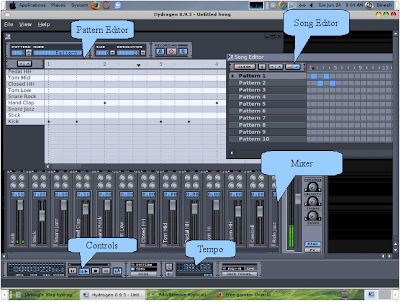 Step 1: Listen to the completed song.
http://saidinesh5.googlepages.com/Reallysimpleturorial.h2song
open the file and simply click the play button!
I know it sounds crazy to even call this a song but, for a newbie, this was the simplest thing that i can think of...
Step 2:Create the song:
Basically the song comprises of 2 patterns:Pattern 1 and Pattern 2, one comes after the other and in Pattern 1: click on the lines on the grid to make black marks appear as shown in the screen shot. To put a mark, simply click on the vertical lines.(click on the mark to remove it) the resolution option on the top of the box, lets you see how dense you want your lines to be packed:(for this tutorial, let it be at 16) the higher the resolution, the more the lines you see.I suggest you play a bit with the resolution and you will understand what i am saying.
Set the tempo to 90bpm(beats per minute). Click on the tempo place shown in the screen shot and set the value.
The Pattern number and Name beside the resolution options shows us which pattern we are editing.For (y)our song we need to bother only about 2 patterns, so i chose Pattern 1 and Pattern 2 . So You have to make the pattern 1 and pattern 2 as shown below:
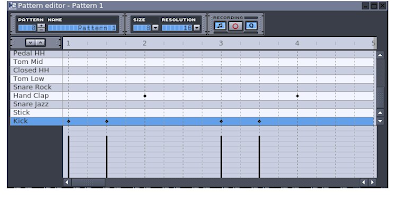
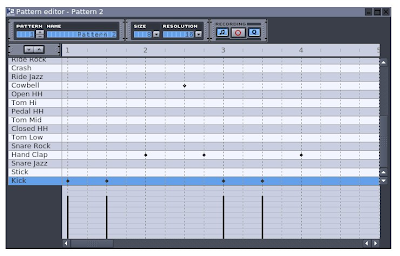
and now you have to place both the patterns in the song editor as:same principle again:clicking on the boxes toggles btw. The blue box means that that pattern will be playin during that time in the song....
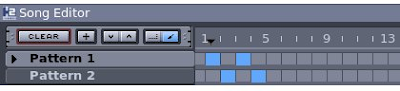 Step 3:
and now its time to listen to what you have made!!!Simply click on the play button (make sure that song mode is selected)...
You might not be that impressed at your first creation, but trust me thats just the “hello world” program for you!. All i wanted to do with this tutorial was to create a basic motivation towards making music and am sure you will build upon this.I myself am no master at making music. infact what i just showed you was born from a lot of trial and error experiments, its been a lot of time fiddling with my computer and my keyboard to teach myself a bit of musical concepts and make some good music and i know there is a lot to do, in order to produce professional beats...and basically good music..
I am also including a few resources that might help you learn a bit more....
Hydrogens homepage
http://www.hydrogen-music.org/
Why should i leave out the really good tutorial in hydrogens documentation???check out the hydrogens help menu!!
A series of articles for people who want to learn more about hydrogen and make really good beats...
http://briansbedroom.blogspot.com/search/label/hydrogen
All d best n Happy Making Beats!!!
Article Written by : Sai Dinesh (saidinesh5@gmail.com)
For Desktop on Linux Blog , http://linuxondesktop.blogspot.com
(C) 2008 , Sai Dinesh
Available link for download


Saturday, October 22, 2016
Magix Music Maker 2016 Live Final Crack Is Here
Magix Music Maker 2016 Live Final Crack Is Here
Magix Music Maker 2016 Latest Full Version With Crack & Serial Key
 |
| Magix Music Maker |

- Very fast, secure & friendly to use.
- Live performing system.
- Smart objects, track and master effects interface.
- New harmony editing system has included.
- MIDI controllers.
- More than two plugin per effect rack.
- Smart Split Up. move loop & lock pads automatically.
- New screen keyboard Scale mode included.
- Various smart & gorgeous sound effects & more...
- Download Magix Music Maker 2016 from the below download link.
- Disable your internet connection.
- Now Extract all zip file & RAR file.
- Now Install this program.
- Dont run now, if running than close it.
- Copy the given crack and replace it here.."CProgram Files (x86)MAGIXMusic Maker 2016 Live"
- Now run Magix Music Maker 2016, click dont show.
- You have done. Enjoy !!!
- OS: Windows-XP| Vista| Win-7,8,8.1,10 (x32 & x64 Bit)
- Processor: 2 GHz Multiple-Core CPU.
- RAM: 1 GB Of RAM.
- Sound Card: Yes.
- Hard-Disk: 7.5 GB of free space.
- Screen Resolution: 1024 x 768 of display.
- Internet Connection: Yes.
Available link for download
Thursday, October 20, 2016
Midnight Music Manipulation
Midnight Music Manipulation
Hello and welcome to another Photoshop Manipulation Tutorial. In this tutorial I will show you how to combine several stock images to create a fairy fantasy forest. Am not yet an experts in adobe Photoshop but I like the fact that each and every day am learning new techniques.

Download Free PSD File Here
Available link for download
Friday, October 7, 2016
MAVEN Music Player Pro 2 32 02
MAVEN Music Player Pro 2 32 02
Current Version: 2.32.02
Requires Android: 2.3 and up
Category: Music & Audio
v2.32.02 update:
version 2.32.02 is just released.
1. Album art was added in medalist song, folder.
2. Google, youtube function was added in Song info.
3. Popup, setting activity was changed.
4. Other minor enhancements and bug fixes.
5. Mint Skin App was released. (Pro version only)
Overview:
My charming MAVEN Music Player!
Take a music trip with MAVEN Music player, and find out its fantastic control features and unbeatable audio quality. It delivers all the Maven 3D surround effect which presents dynamic and fantastic sound to listeners with real time synchronized lyrics.
Even when using external stereo speakers, multi-channel virtual surround effect offers you highly immersive listening environment.
MAVEN Solution (Multiform Audio Virtualizing & Enhancing Nexus)
1. XOME-i
No headaches, no hurting ears on earphone use. Sound comes out of head and ears, so it creates a feeling like listening through speakers while using earphones and headphones. It provides richer and cleaner sound quality. Enjoying High fidelity audio is available on mobile devices with XOME-i.
2. LIVE
Realization of 3 dimensional presence of powerfully reverberating sound when listening with earphone or speaker by creating the feeling of appreciating music in an actual live concert hall.
3. MEX
Reinforce insufficient reproductive capability of low-pitched and high-pitched sounds, while reinforcing stereo component of sound in order to further widen width of the stereo sound.
4. EQUALIZER
Equalizer will adjust levels of each frequency band of sound, enabling the user to adjust the quality of a tone to his taste.
This Solution is provided with a type that the user can adjust levels of each band like 9 band, or in preset type or in userset type. Provided preset can be configured with maximum 13 kinds including VOICE, JAZZ, CLASSIC, ROCK, DANCE, etc.
5. EVS
Now, you can enjoy virtual surround sound through your normal stereo speakers. Virtual 5.1 Speaker is a solution that enables creation of wider and affluent stereo sound images under such environment. Voices are placed in front of you and ambient sound appears all around you… just like a live performance
— Features for Pro Version only –
1. MAVEN Effect Usersetting.
2. Playback Speed Control (50 ~ 200%)
3. Lyrics (using standard ID3 tags).
4. Notification Control Support (android 4.0 over)
5. Provide new skin plug In
Change the user skin of the Player by installing one of the 5+ available SKINS.
You can download “maven player metal, black, yellow, wood, blue Skin” on Market.
6. Overlay Control Window
7. Tag Editing
– Features for Free/Pro Version –
(Technical support)
1. This version is compatible with Android 2.3 or higher
2. Support Audio Formats : mp3, ogg, wav, mp4, m4a, flac, wma(may require Neon support) (wma10 not support)
(Main Feature)
1. MAVEN Effect(3D sound)
A. XOME-i(Externalization), Live(Reverberation), Mex(Maestro), EVS(Virtual Speaker)
B. 9 band graphic equalizer, 13 default preset (Voice, Jazz, etc), Custom preset (Save, Remove)
2. Response Curve of Equalizer
3. Volume Control (Media Volume, Pre Volume, Left/right channel adjustment)
4. Brightness control
5. Play music by artits, albums, songs, playlists, genres and folders
6. Songs search
7. Songs Rescan
8. Playlist management
9. Multi Select, Delete, Play, Add to Playlist
10. Repeat and Suffle
11. 3 configurable widget types (size: 4×1, 4×2, 4×4)
12. Read Phone state
(In order stop/resume playback during incoming / outgoing calls, Player requires read only rights to read phone state)
13. BlueTooth Control
14. Earphone(Headset) Button control(press to pause/resume, double/triple press to play next/prev)
15. Lock Screeen
16. Sleep Timer
17. Fade In/Out
18. Ringtone
19. Moving the SD Card
20. Help of Play, Volume, Effect
21. Landscape mode
22. Display song title
? If you find bugs or have any queries and suggestions, please contact us via e-mail and FaceBook. We will be happy to correspond with your comments.
? Updates will be provided with plenty of additional features in near future.
? Facebook : http://ift.tt/13aQQFi
? E-mail : emersys2012@gmail.com


Download MAVEN Music Player (Pro) 2.32.02 APK here.
Available link for download