Showing posts with label data. Show all posts

Monday, February 27, 2017

Mengkonversi dari FAT32 ke NTFS tanpa kehilangan data

Mengkonversi dari FAT32 ke NTFS tanpa kehilangan data


Disk, harddisk atau media penyimpanan sekarang ini pada umumnya sudah menggunakan file system NTFS. Dengan menggunakan file system NTFS, performa disk atau harddisk tersebut akan lebih meningkat, termasuk dalam hal security atau dari segi keamanan.

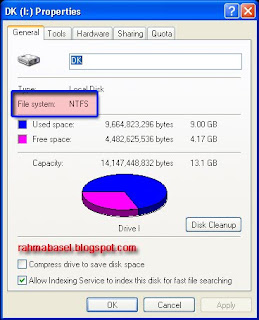
Untuk melihat file system drive, dapat dilakukan dengan cara klik kanan pada drive yang akan dilihat file systemnya (FAT32 atau NTFS) kemudian pilih properties.


Untuk mengkonversi dari FAT32 ke NTFS dapat dilakukan dengan sangat mudah tanpa kehilangan data.

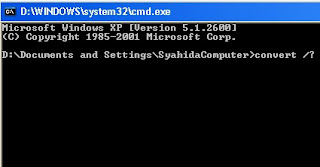
Untuk melakukan konversi dari FAT32 ke NTFS kita menggunakan perintah dari command Prompt. Untuk masuk ke command prompt lakukan klik start > Run > ketik cmd > tekan enter.

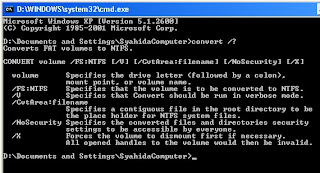
Untuk melihat panduan convert, ketikkan perintah convert /? Kemudian tekan enter.


Maka akan muncul sederetan keterangan tentang cara penulisan perintah convert.


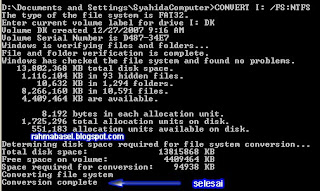
Untuk melakukan convert pada drive atau partisi (misalnya Drive I), maka perintah yang diketik adalah Convert I: /FS:NTFS kemudian tekan enter dan tunggu sampai proses selesai dengan ditandai munculnya tulisan conversion complete


Jika yang dikonversi adalah pada file tertentu saja, maka perintah yang diketik adalah Convert I: /FS:NTFS /V /CvtArea:tulis nama file anda.
Jika ditambah dengan /NoSecurity berarti file yang dikonversi bisa diakses oleh semua user.

Setelah di konversi maka pada jendela properties drive I menjadi seperti digambar dibawah ini :


Dan yang penting, data tidak hilang


Next for info updatenya sob :)

Available link for download

Wednesday, February 8, 2017

Mengembalikan Data File Terhapus Recuva

Mengembalikan Data File Terhapus Recuva


RECUVA 
Memulihkan/ data Anda terhapus dengan cepat dan mudah.


Tidak sengaja menghapus file? atau kehilangan file setelah komputer anda bermasalah?
Jangan kawatir dengan Recuva data file anda bisa kembali diselamatkan mulai di komputer, recycle bin, kartu kamera digital, atau pemutar MP3, Flashdisk dll.

Berikut Ulasan tentang software penyelamat ini.

Recovery file superior.
Recuva dapat memulihkan gambar, musik, dokumen, video, email atau jenis file lain yang telah hilang. Data kembali pulih dari perangkat apapun seperti : kartu memori, hard drive eksternal, stik USB dan banyak lagi!

Pemulihan dari disk yang rusak.
Tidak seperti kebanyakan alat recovery lainnya, Recuva dapat memulihkan file dari drive rusak atau baru diformat. Fleksibilitas yang lebih besar berarti kesempatan lebih besar untuk pemulihan.

Scan menyeluruh untuk file yang lama hilang.
Bagi mereka sulit untuk menemukan file, Recuva juga memiliki mode deep scan yang canggih dimana dapat menelusuri drive Anda untuk menemukan jejak file yang sudah dihapus.

Cara aman menghapus file.
Kadang-kadang Anda ingin file pergi untuk selamanya agar bila perangkat hilang orang lain tidak bisa mencurinya. Fitur Recuva ini menggunakan teknik penghapusan tingkat dalam untuk memastikan file benar-benar terhapus.

Recuva ini mempunyai versi gratis dan berbayar dimana yang berbayar pasti lebih baik namun pengguna biasa dapat menggunakan versi yang gratis saja.

Apa saja didapat versi Gratis dengan berbayar?

Recuva GRATIS Recuva PROFESIONAL
Recovery file menyeluruh Recovery file menyeluruh
Virtual dukungan hard drive
Pembaruan otomatis
Dukungan Premium


Untuk versi berbayar biaya $24.95 jika di kurs indonesia per hari ini Rp. 14.600 = Rp. 364.270,-
Screenshoot :


Download recovery secara gratis disini atau disini.
Untuk ingin tahu lebih lanjut bisa buka websitenya di www.piriform.com/recuva.

Terimakasih sudah membaca artikel saya.
Semoga bermanfaat.

Available link for download

Friday, January 13, 2017

Monster truck Destruction v2 63 Apk Data Mod Android

Monster truck Destruction v2 63 Apk Data Mod Android


Monster truck Destruction v2.63 Apk Data Mod


Monster truck Destruction v2.63 Apk Data is the property and trademark from the developer ODD Games, all rights reserved. Please be aware that DriveAPK only share the original and free apk installer for Monster Truck Destruction™ v2.63 WITHOUT ANY cheat, crack, unlimited gold patch or any other modifications. Monster truck Destruction v2.63 Apk Mod is an awesome monster truck game with realistic truck physics. In the game, you could feel the real-time damage to the trucks.Just get behind the wheel of one of 30 monster trucks and put it to its limits to destroy everything in sight. Brings the exciting world of Monster Trucks right to you with really good graphics and realism. Just get behind the wheel of one of 30 monster trucks and put it to its limits to destroy everything in sight.

Monster truck Destruction v2.63 Apk Features:

  • Modified steering
  • Add automatic performance settings on startup
  • Fixed minor bugs
  • Improved performance for some devices
  • Thrilling and destructive gameplay
  • Realistic truck physics and a dynamic damage system
  • Drag, Freestyle, and Championships to compete in
  • Excellent visuals and a head-banging soundtrack
  • Choose from four different control methods from tap steering to dual joysticks
  • Take pictures of your stunts and share then on Facebook and Twitter
Monster truck Destruction v2.63 Apk HackMonster truck Destruction v2.63 Apk DataMonster truck Destruction v2.63 Apk Data Mod hack

Download Monster truck Destruction v2.63 Apk Data Mod Android app and play around with truck physics that cause trucks to bounce, drift, and tire slip realistically. Smash through cars to see the dynamic damage system in action and impressive graphics.
Monster truck Destruction v2.63 Apk Data Mod Android>> Click Here
Download Now | Google Play | OBB File

Available link for download

Saturday, December 31, 2016

Microsoft Data Access Components Vulnerability Pwn2Own heap overflow

Microsoft Data Access Components Vulnerability Pwn2Own heap overflow


In pwn2own 2010 Peter Vreugdenhil founder of Vreugdenhil Research, Holland found a vulnerability in Microsoft Microsoft Data Access Components Vulnerability - Pwn2Own heap overflowData  Access Components which allowed him to pwn windows. The vulnerability was a int wrap during heap allocation which was later used to store a bit more information then would fit in there. To be more specific as he explains at his blog -

<XML ID="xmlid1">
<Devices>
<Device>
<AAAAAAAAAAAAAAAAAAAAAAAAAAAAAAAAAAAAAAAAAAAAAAAAA />
</Device>
</Devices>
</XML></pre>

Inside an HTML file would give you access to what is called an XML Data Island. This is actually acts as an database interface. You can query the XML data, retrieve rows and data and add more rows. The underlying object is an MSAdo object.
The db objects exposes a property called ‘CacheSize’ that you can use to determine how many records it should keep in its cache. Internally the CacheSize is multiplied by 0×4 and then 0×10 is added (I am typing this from memory so I might be a bit off, but the rough data is correct).

You can read about the vulnerability at Vreugdenhil Research .

Pwn2Own – Paper by Peter Vreugdenhil


Like This post ?  You can buy me a Beer :)


Available link for download

Wednesday, December 28, 2016

Memory Card Data Recovery Software Free Download Ali Khan 7 43 PM Download Memory Card Data Recovery Software Free Download

Memory Card Data Recovery Software Free Download Ali Khan 7 43 PM Download Memory Card Data Recovery Software Free Download


Memory Card Data Recovery Software Free Download

 
7:43 PM
Download

Memory Card Data Recovery Software Free Download

Memory card data recovery software is now released with the name of CardRecovery for windows. Card recovery software used to recover photos/images/pictures and other important data from SD, Micro and other camera memory cards instantly. Memory card data recovery software provides you excellent features to recover data from flash memory cards instantly. Card recovery is worlds leading software that can easily restore images/pictures/photos right from your card reader. Digital media and USB flash drives are appears as latest technology devices available in small size and provides maximum size than hard drives and other storage media. Digital media like phone, memory cards and USB flash drives contains most important and personal data of user.
The accidental formatting, corrupting, deleting are the mostly faced problems by the users now a days. Card recovery provides simple, fast, secure and instant way to recover music, photos, videos and other document files without wasting time and money as well. Card recovery supports almost all types of memory cards with addition of all company products. Card recovery 6.10 is especially designed for windows 8 users with both 32-bit and 64-bit environments. Card recovery is able to recover lost, deleted, corrupted and formatted partitions easily. There are various popular data recovery software available as free download such as R-studio, Recuva, Get data back, Power data recovery, EaseUS Todo backup free, Paragon backup and recovery and lots of more.

Supported Memory Card Types:

Card recovery software supports wide range of memory card, flash readers and other removable media memory devices. These devices are SD card, M2 card, miniSD card, MicroSD card, secure digital camera card, compact card, micro drive, MMC (multimedia card), flash card, smart card, mobile phone memory, digital camera memory, android phones, USB flash drive, micro SDHC, Micro SD as mobile memory and many others. These card types are supported including with scanning for damaged and deleted files and then recover the seen files easily in your computer desktop.

Supported Memory Card Companies:


Memory card data recovery software is simple, fast and intelligent data recovery software that supports up to all types of companies or manufactures of memory card media. These companies are HP, Kingston, SanDisc, Sony, Samsung, Toshiba, Panasonic, Olympus, A-data, Transcend and many others that are available in market. You can even recover your personal data from all these manufactures because card recovery easily gets the information about the removable media storage with its internal technologies.

Supported Camera and Phone Brands:


Card recovery easily gets information about the removable media storage that is attached with computer. Card recovery database filled with different popular and non popular manufactures, companies and their brands as well. It follows and completes the task given by the user efficiently and instantly. The supported brands and products are Nikon, Sony, Samsung, HP, Olympus, Panasonic, Polaroid, Canon, Kodak, Agfa, NEC, Epson, Sanyo, Ricoh, L.G, Sharp, Android, Blackberry, Toshiba, SanDisc, JVC, Nexus, Motorola, Nokia, HTC and lots of more.

Supported Image Formats:


Card recovery is professional data recovery software that allows instant and accurate picture/photo/image recovery to its users. Card recovery supports all types of simple, standard, camera, mobile phone and other high quality image files and easily gets them back without wasting the time and money of user. Card recovery supports JPG, TIF, JPEG with addition of some RAW material of some specific camera devices. These are Canon CR2, Canon CRW, Fuji RAF, Konica Minolta MRW, Samsung DNG, Sony SRF, Panasonic RAW, Olympus ORF and more others.

Supported Music Formats:


Card recovery also supports some music/audio file formats recovery. Card recovery doesnt support lots of music file extensions but some popular and mostly used file formats are supported. These are MP3, AMR and WAV file formats as well.

Supported Video Formats:


Card recovery is able to recover your lost videos that are captured by camera or mobile device. Card recovery supports lots of video file formats that are mostly used by camera and mobile phone manufactures. These video file formats are AVI, MPG, MP4, MOV, ASF, 3GP, MTS and more. These videos of memory card can be recovered easily without wasting valuable time of user and spending more money to purchase expensive data recovery software.

Application Details

Size: 826 KB
Version: 6.10
License: Freeware
Platform: Windows
Developer: Card Recovery
Memory Card Data Recovery Software Free Download

Available link for download

Sunday, December 4, 2016

Mengembalikan Data dari CD DVD Rusak

Mengembalikan Data dari CD DVD Rusak


Salah satu cara mem-backup data yang sekaligus berguna untuk mengosongkan ruang hard disk komputer Anda yang sudah sesak adalah dengan menyalinnya ke dalam cakram data (baik CD maupun DVD). Fungsi backup sebenarnya adalah demi melindungi data. Namun dengan menyalinnya ke dalam cakram data bukan berarti data Anda terjamin telah terlindungi secara total.

Setelah disalin atau dicadangkan, tentu cakram data harus selalu dirawat dan dilindungi dengan baik. Jika masih sering digunakan, dia dapat saja rusak, tergores, atau luka parah. Sedangkan apabila disimpan saja, ancaman jamur bisa menyerang.

Jika kedua hal di atas terjadi, data terancam hilang. Namun jika kondisinya tidak terlalu parah, Anda masih dapat menyelamatkannya. Caranya yakni dengan menggunakan program data recovery khusus untuk CD/DVD yang banyak tersedia (termasuk untuk keping data bara semacam Blu-ray). Yang gratisan ada, yang berbayar juga tersedia.
  • Salah satu aplikasi gratisan untuk menyelamatkan data yang bisa Anda jajal adalah CD Recovery Toolbox Free. Anda bisa mengunduhnya di www.oemailrecovery.com.  Jika sudah selesai didownload, silakan instal file installernya yang bernama CDRecoveryToolBoxFree Setupexe (berukuran 650Kb).
  • Setelah terinstal, aktifkan aplikasi dari menu Start sambil memasukkan CD/DVD yang hendak diselamatkan ke dalam tray CD/DVD drive. Tunggu beberapa saat hingga muncul jendela utama pada layar. Secara otomatis aplikasi ini akan mendeteksi data yang ada di dalam cakram data tersebut. Pilih nama CD/DVD yang muncul dalam layar program, lalu klik [Next].
  • Pada jendela berikutnya, “Target directory”, tentukan folder untuk menyimpan data hasil penyelamatan dengan mengklik ikon bergambar folder di atas menu “Source drive”. Cari dan pilih folder simpan pada jendela Browse For Folder, lalu klik [OK]. Pastikan informasi di “Source drive” dan “Target drive” sudah benar. Klik [Next] lagi.
  • Program akan mendeteksi isi dalam CD/DVD, baik itu file maupun folder. Anda bisa menyelamatkan semua data yang ada dengan mencentangi direktori optik atau klik [Check All]. Jika hanya ingin menyelamatkan beberapa data saja, hilangkan centang di direktori drive optik, lalu centangi folder atau file yang dihendaki. Klik [Save].
  • Proses penyelamatan data akan ditunjukkan dengan munculnya jendela “Restore log” dan proses yang menunjukkan file-file yang sedang diambil kembali. File yang berhasil diselamatkan akan ditandai dengan keterangan “saved’ berwarna hijau. Jika gagal, ia akan berwarna merah.             
  • Pada jendela terakhir akan muncul keterangan semua file yang berhasil diambil kembali dari cakram data yang rusak. Akhiri dengan mengklik [Exit], lalu periksalah folder simpan hasil recovery apakah sudah terisi file yang berhasil diselamatkan.

Menggunakan CD Recovery Tool Box ternyata sangat membantu kita dalam mengembalikan/menyelamatkan data yang tersimpan di cakram data CD/DVD yang telah rusak.

Komentar Anda Sangat Bermanfaat Bagi Perkembangan Blog InI

Available link for download

Monday, October 31, 2016

memory card Data recovery

memory card Data recovery


memory card Data recovery
**********************


Available link for download